


CDisplayEx Comic Reader Lite
4.0307.00 Reviews
App Specs
- Version
- Varies with Device
- Updated On
- License
- Free
- Downloads
- 1,000,000+
- Developer
- Progdigy Software
- Categories
- Comics
- Platform
- Android
Screenshots
 Analysis by AppCompare
I approach a comic reader differently from a comic shop or subscription service: the important question is how well it lets me read files I already have, and how comfortable I feel managing that collection on my device. CDisplayEx Comic Reader Lite is a free comics app from Progdigy Software, aimed at that file-first kind of reading. Its appeal is practical rather than flashy, but that also means the experience depends on how you organize your comics and what you expect from a digital library.
What the app is built for
This is a reader for bringing your own comics, not a storefront where I browse a catalog and buy issues. That distinction matters: if I want a single place to discover new series, follow releases, or access a subscription library, a digital comics shop is likely a better fit. If I already have files and want to read them on a phone or tablet, a dedicated reader can be a more direct option than opening each item in a general-purpose document viewer.
The app is rated for Everyone, has a 4.1 average from around 14,000 ratings, and has passed one million installs. Those figures suggest it has reached a broad audience, but they don’t tell me whether a particular file will look or feel right on my device. I’d treat them as context, not as a substitute for checking that my own collection and reading habits suit a file-based reader.
Trust starts with what you can verify
When I install any reader, I pay attention to the choices it presents and to the permissions requested by the version on my device. I don’t assume that a simple reading interface automatically means minimal data handling, nor do I infer a privacy policy from the app’s purpose. A sensible first step is to review the current permission prompts and the app’s privacy information in the store before importing personal files.
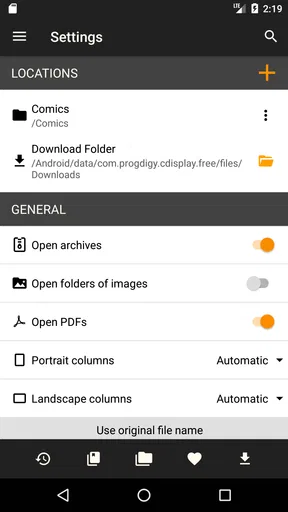
That matters especially if your comics sit in folders alongside documents you would rather not expose broadly. I’d choose only the folders needed for reading when the system offers a scoped file picker, rather than granting wider access just for convenience. If the device presents a choice between selecting individual files and allowing access to a larger library, the narrower option is a good starting point; you can expand access later if browsing becomes inconvenient.
Keep your collection under your control
A practical benefit of a file-based workflow is that your reading list can be built around your own collection instead of a service’s catalog. Before importing a long run, I’d test one representative comic: open it, check whether the cover and pages appear correctly, try the reading direction and zoom, then see whether returning to the library is straightforward. That small check can reveal a mismatch early, without turning a whole evening of reading into troubleshooting.
For a shared tablet, I’d also think about where files are stored and who can open them. The reader is only one part of that setup: device profiles, folder access, and screen locking are separate controls worth considering. If you lend the tablet to someone, don’t assume a reading app by itself creates a private shelf or hides the rest of your collection.
Worth Reading Before You Choose

Flipboard Shows What News Apps Must Do Beyond the Feed

Switching to Android Auto Means Rethinking Your Driving Routine

Google Calendar Makes a Crowded Week Easier to Manage

Ludo King Makes the Most of the Minutes Between Plans

Baby Panda World Brings Quick Play to Modern Phones, but Its Game Library Feels Busy

ESPN’s Live Game View Makes Following Close Games Easier
Getting Started with CDisplayEx Comic Reader Lite
First things first, downloading and installing the CDisplayEx Comic Reader Lite app was a breeze. Available on both Android and iOS, the app is lightweight and doesn’t eat up much of your device’s storage. Once you open it up, you’re greeted with a clean, easy-to-navigate interface that’s perfect whether you’re a seasoned comic reader or just getting started.
User-Friendly Interface
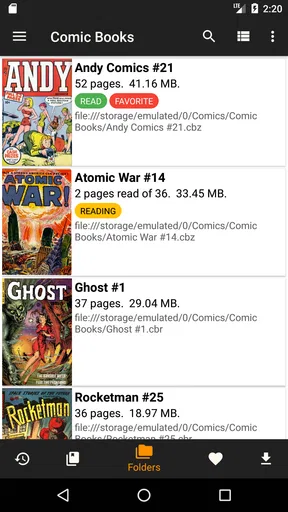
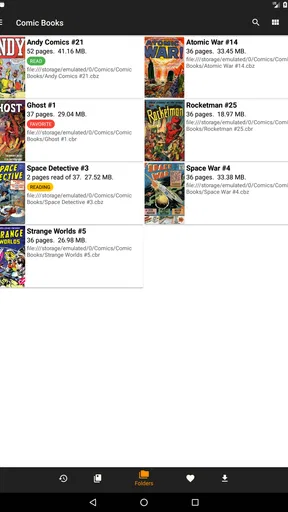
The app’s design is straightforward, focusing on functionality rather than flashy aesthetics. I appreciate this approach because it means less clutter and more focus on the comics themselves. You can easily import your comic files, and the app supports a wide range of formats like CBR, CBZ, PDF, and more. So, no need to worry about converting your collection.
That broad format support is useful, but I still recommend testing a file from each source you use. A clean scan, a comic exported from another program, and a large image-heavy issue can behave differently in any reader. If something looks wrong, I’d first check the source file and try another reading mode before assuming the whole library needs reorganizing.
Reading Experience
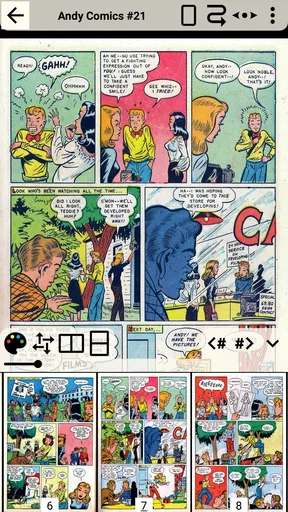
Once you start reading, you’ll notice how smooth everything is. The page-turning is seamless, and there’s no lag, which is essential when you’re engrossed in a gripping storyline. You can zoom in and out without any loss in quality, which is perfect for admiring those intricate details in the artwork. The app also supports multiple reading modes like single page, double page, and continuous scroll, catering to whatever your preference might be.
Those modes are more than cosmetic. On a phone, single-page reading is often easier when dialogue is small, while continuous scrolling can suit a comic laid out for vertical viewing. A double-page spread may preserve the composition of a wide scene, but on a narrow screen it can shrink lettering enough to make zooming necessary. I’d switch modes based on the page rather than locking myself into one setting for every book.
A useful habit for long sessions is to check the page at the size you naturally hold the device. If you find yourself repeatedly pinching in and out, try a different mode or rotate the screen before blaming the artwork or the file. On a tablet, a spread can feel natural; on a phone during a commute, a single page may be more comfortable and easier to manage one-handed.
If you’re like me and often read at night, you’ll love the night mode feature. It’s easy on the eyes and lets you enjoy your comics without straining your vision. Plus, the app remembers where you left off, so you can pick up right where you left off without any hassle.
For an everyday example, I might read a few pages during a lunch break, close the app to answer a message, and return later at home. Remembering my place makes that stop-and-start routine less fiddly. I’d still make a deliberate note of a series or issue if I’m switching between several books, since a saved page position answers “where was I?” but doesn’t necessarily replace a clear personal reading order.
Customization Options
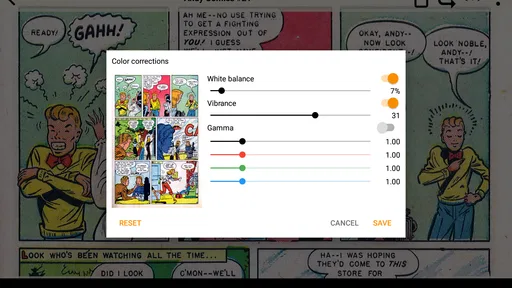
CDisplayEx Comic Reader Lite is all about making the reading experience personal. You can adjust the brightness, contrast, and saturation, tweaking the visuals to your liking. I played around with these settings and found the perfect balance that made the colors pop just right. There’s also an option to customize the page transition effects if you want to add a bit of flair to your reading.
I’d use image adjustments with a light touch. Raising contrast can make pale scans easier to read, but pushing it too far may flatten subtle shading or make fine lines harsh. Similarly, extra saturation can enliven muted art while changing colors that the artist intended to look restrained. My preference is to make small changes for a difficult scan, then return to a neutral setting for other books rather than treating one adjustment as ideal for the whole library.
Library Management
Managing your comic library is super intuitive. You can organize your collection by title, author, or series, making it easy to find what you’re looking for. There’s also a search function that works like a charm, allowing you to quickly locate any comic in your library. It’s a lifesaver when you have a massive collection and don’t want to scroll endlessly.
For a growing collection, consistent filenames and folders can do as much for navigation as the reader’s sorting options. I’d keep issues from a series together and use names that make their order obvious, especially when a title has specials or multiple volumes. That is a modest bit of preparation, but it helps avoid opening several near-identical covers just to work out which one comes next.
There is a trade-off between convenience and control here. Letting a reader scan a broad collection can make everything easier to find, while selecting a smaller folder keeps the library focused. If you read only a few books at a time, a compact reading folder is easier to manage; if you keep a large archive on the device, taking time to organize it before browsing can make searches more useful.
Performance and Stability
Throughout my time using the app, I didn’t encounter any crashes or bugs, which is always a plus. The developers have clearly put in the work to ensure the app runs smoothly on a variety of devices. Even with several comics loaded, the app maintained its speed and efficiency.
My smooth experience is not a promise that every device or file will behave identically. A very large scan, a damaged archive, or an unfamiliar file can be a different test from an ordinary issue. If one comic fails to open, I’d try another file and check the original archive before concluding that the reader is unreliable. Keeping a spare copy of valuable files is sensible regardless of which app you use.
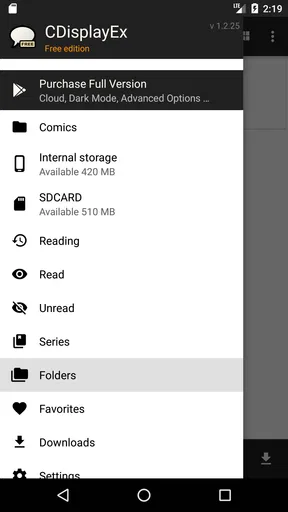
The app is free, which makes it easy to try without committing to a purchase. The word “Lite” is worth keeping in mind, though: people comparing it with a paid edition should check the current app details to see which differences matter to them. I wouldn’t choose a reader based on an assumed feature set; I’d first decide whether the basic workflow handles my files and whether I need anything beyond straightforward reading and library browsing.
Where it fits among other readers
Compared with a general PDF viewer, a comic-focused reader is appealing when you want comic files together and prefer controls built around pages, spreads, and artwork. A PDF app may be preferable if your reading is mostly conventional documents or if you rely on a broader document workflow. Compared with a subscription comics service, this app gives the reader a different job: it is for opening a personal collection, not discovering a ready-made licensed catalog.
That makes the best choice depend on what you already own. If your comics are stored as compatible files and you want to read them locally, this approach can feel refreshingly uncomplicated. If you want recommendations, cloud-based purchasing, or a service that handles the catalog for you, a store or subscription app may save effort. I would not expect a file reader to replace those discovery and account features, just as I would not expect a storefront to be the easiest place to manage a personal archive.
Who will get the most from it
I’d recommend trying it if you already keep digital comics and want a dedicated place to read them, especially if you move between a phone and a tablet or like choosing between single pages, spreads, and scrolling. It also suits readers who value adjusting the picture for older scans and finding books through their own library rather than browsing a commercial catalog.
I’d steer someone toward another option if they have no comic files and mainly want to browse or buy issues inside an app. It may also be a poor fit for anyone who expects a reader alone to synchronize a complete collection across devices or provide a managed account library. Those needs should be checked against the specific alternative before switching, because a local file workflow and a cloud catalog solve different problems.
A cautious way to make it yours
When I start with a new reader, I prefer a small trial run: add a couple of representative files, check page order and image appearance, test the controls in the lighting where I usually read, and search for a title I know is there. Then I decide whether to add the rest of my collection. This is a more useful test than simply opening one cover, because it checks the practical steps that matter during ordinary use.
I also revisit my choices when the device changes. A larger screen can make double-page reading more comfortable, while a phone may call for a different mode and brightness level. If the app requests access to files, I consider whether the selected scope still makes sense for how I use it. That keeps the setup intentional without turning a casual reading habit into a complicated privacy exercise.
Progdigy Software’s reader has been around since April 15, 2018, and its established presence is reassuring in a modest way, not a guarantee about future updates or any particular data practice. I judge trust more by the controls I can inspect on my own device and the way I choose to grant access than by popularity alone. The developer’s name is useful context, but my own cautious setup remains the practical safeguard.
Overall, CDisplayEx Comic Reader Lite is a sensible choice when the goal is to read a personal comic collection without paying for a catalog service. I like its straightforward presentation, flexible reading modes, image adjustments, and library search, while recognizing that file organization and device-level access choices remain part of the experience. I’d start with a small set of comics and see how it fits my routine; if I wanted discovery, purchases, or a managed online library instead, I’d choose a different kind of comics app.
Pros
- User-friendly interface for easy navigation.
- Supports a wide range of comic formats.
- Fast loading and smooth scrolling.
- Offline reading capabilities.
- Customizable reading settings.
Cons
- Ads in the free version can be intrusive.
- Limited features compared to the full version.
- No cloud sync for reading progress.
- Occasional crashes on older devices.
- Lacks advanced annotation tools.
FAQs for CDisplayEx Comic Reader Lite
What is CDisplayEx Comic Reader Lite?
CDisplayEx Comic Reader Lite is a highly popular comic book reader designed for Android and iOS devices. It supports various file formats such as CBR, CBZ, and PDF, allowing users to enjoy their favorite comics seamlessly. The app is praised for its user-friendly interface and smooth performance.
Is CDisplayEx Comic Reader Lite free to use?
Yes, CDisplayEx Comic Reader Lite is available for free on both Android and iOS platforms. However, there might be in-app purchases or ads within the app. Users can choose to upgrade to a premium version for an ad-free experience and additional features.
What file formats does CDisplayEx Comic Reader Lite support?
CDisplayEx Comic Reader Lite supports a wide range of comic file formats, including CBR, CBZ, PDF, and more. This versatility makes it an excellent choice for comic enthusiasts who have collections in different formats, ensuring a smooth and comprehensive reading experience.
How is the user experience on CDisplayEx Comic Reader Lite?
The app offers a smooth and intuitive user experience, featuring easy navigation and a clean interface. Users appreciate the quick loading times and customizable reading options, such as page transitions and zoom functions, which enhance the overall enjoyment of reading comics on mobile devices.
Does CDisplayEx Comic Reader Lite offer cloud storage integration?
Yes, CDisplayEx Comic Reader Lite offers cloud storage integration, allowing users to access their comic collections from services like Google Drive and Dropbox. This feature provides the convenience of syncing comics across devices, ensuring your library is always at your fingertips.


